
Office Door Access Card Compatibility: How to Identify Your Card
Seamless Office Card Replacements: Verifying Specs Before Ordering
When your offices, residential or commercial buildings, and industrial plants, the administrative teams are often asked to reordering access cards. And here is where their challenges begin.
A common issue in access control procurement is ordering blank white cards solely based on physical appearance. While standard CR80 PVC Blank cards look exactly the same on the outside but their internal microchips and operating frequencies differ.
Don’t worry, MEX is here to help. We often receive a message just asking us ‘Can you supply this card?’ and attaching the card image to us as well. Here are some simple and basic standards that allow you to have first confirmation from your own.
Verifying and knowing your existing access card specifications before proceeding to bulk ordering takes less than 5 minutes using 3 reliable methods.
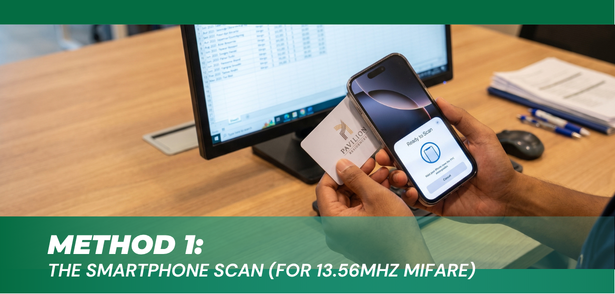
Method 1: The 10-Second Smartphone Scan (For 13.56MHz MIFARE)
Simply use your smartphones with built-in NFC features to scan 13.56MHz high-frequency (HF) RFID chips.
Step-by-Step Instructions:
- Download a free app such as NXP TagInfo, NFC Tools, or MIFARE Classic Tool.
- Ensure NFC is toggled ON in your smartphone settings.
- Tap your existing office access card near the top back of the phone.
- Interpreting the Result:
- If the phone vibrates/beeps: Your card is a 13.56MHz High-Frequency card.
- Take a screenshot of the summary screen. Look for the IC Manufacturer (e.g., NXP), Chip Type (e.g., MIFARE Classic 1K, DESFire), and Card UID.
- If the phone does not react at all: Your card is likely a 125kHz Low-Frequency Proximity card (proceed to Method 2).
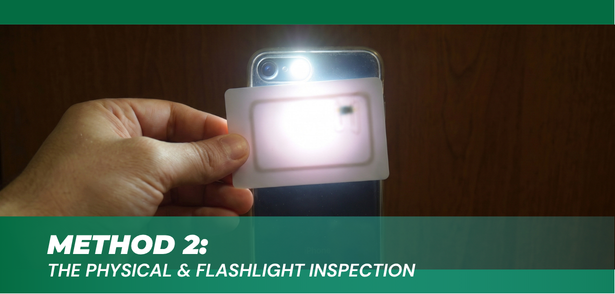
Method 2: The Physical & Flashlight Inspection (For 125kHz Proximity)
Because our smartphones cannot interact with 125kHz low-frequency (LF) signals, we have to use a physical method to further verify it.
1. Card Numbering on The Card
- 125kHz Proximity Cards: Often feature an 8-digit to 18-digit sequence printed directly on the lower corner of the card (e.g., 0001234567 or 0012,57130).
- MIFARE Cards: Typically arrive as blank white PVC unless custom printing or sequential numbering was added during card production.
2. The Flashlight Antenna Test
Hold your access card directly flat against a smartphone flashlight or LED torch in a dim room to illuminate the internal antenna embedded between the PVC layers:
| Antenna Shape Under Flashlight | Frequency & Chip Family | Common Use Cases |
| Round / Oval Thick Coil (Centered or near chip) | 125kHz Proximity (EM4100 / EM4200 / TK4100) | Basic door entry, simple barrier gates, attendance. |
| Rectangular Wire Along Edge (Runs along outer perimeter) | 13.56MHz Smart Card (MIFARE Classic / DESFire) | Encrypted office access, multi-door commercial systems, contactless school ID card. |
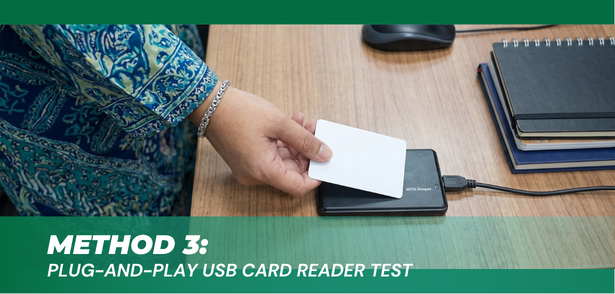
Method 3: The Plug-and-Play USB Card Reader Test (For Installers & Facilities)
For CCTV contractors, security door installers, and facility managers who manage multiple client sites, relying solely on mobile apps is not always practical.
The Direct Desktop Method:
- Connect a standard 125kHz or dual-frequency USB desktop reader to a PC or laptop. Without any driver installations.
- Open a blank Notepad document.
- Tap the unknown card on the card reader.
- The Result: The reader will instantly type the card’s number (CN) directly into the text editor. This confirms a 125kHz frequency and verifies the number formatting.
Understanding Technical Variations Before You Restock
Beyond basic frequency, two technical factors determine complete door compatibility:
1. MIFARE Chip Family Differences
Not all 13.56MHz cards function the same way:
- MIFARE Classic (1K/4K): The standard choice for commercial office towers and general door access in Malaysia.
- MIFARE DESFire (EV1/EV2/EV3): Features high-grade hardware cryptographic engines (AES/DES). Common in financial institutions, government facilities, luxury hotels or properties and critical infrastructure.
- MIFARE Ultralight: Limited memory capacity; primarily used for transit ticketing and visitor passes.
2. Matching Internal Chips to Your Controller System
Many office buildings and access controller systems require the cards to be programmed with a specific code format (often called a Wiegand format).
When reordering for your staff, you need to ensure two things align perfectly:
- Chips Encoding: The hidden digital number inside the chip must match your door reader’s software requirements.
- Card Numbering: If your SOP is to log cards by reading the numbers printed on the access card, we will need to ensure those visible serial numbers are printed sequentially and match the internal chip data perfectly.
How to Verify Your Card Specs and Request a Quote
If you are ready to restock your office access cards and want to verify compatibility before bulk ordering, use this 4-point checklist:
- Card Type / Frequency: Share your NXP TagInfo app screenshots or a photo of your card held against a flashlight.
- Estimated Quantity: Tell us your total order quantity. Highlight to us if you need this order to be fulfilled by batches.
- Blank vs. Custom Printed: Specify if you require plain white cards or custom card prints (It would be great if you could always share your current card image with us, or if you already have ready artwork).
- Chip Encoding & Card Numbering: Confirm whether you need standard factory chip serial numbers or custom Wiegand formats. Last but not least, let us know if you require sequential card numbering for your bulk orders.
[Send Card Photos via WhatsApp for a Compatibility Check & Quote]
A Trusted Local Partner for Your Office Access Cards
Whether you need a quick batch of blank replacement door cards for your Kuala Lumpur office or a bulk order of custom‑printed corporate IDs for a site in Sarawak — MEX got you covered!
–Support with Patience: We will help you break down and identify the right card specs for your office system.
–Step-by-step Guidance: Still confused by testing methods? Just drop us a message — we’ll walk you through it.
–Risk-Free Sample Testing: Most importantly, we are always willing to send you physical sample test cards to test on your actual door readers before committing to a large bulk order.
Reach out anytime — we’re here to help!